Tuesday, November 15, 2016

NEW Google Sites is LIVE

Finally, the day that we have all been waiting for! The NEW Google Sites is LIVE for anyone to use.  The user friendly ability to drag and drop items from Google Drive (Docs, Sheets, PDFs, Images, Charts and More), move text boxes and create pages that are truely your own! 

Check out the video below for a brief overview of how to create, change, add and publish from the NEW Google Sites! 


Saturday, September 17, 2016

Communication is Key

At the beginning of the year, as we are setting up our Google Classrooms, OneNote Notebooks, and Email distribution lists, we can also think about other ways to communicate with parents and students. The following two means, allow third party texting with parents and students, but NO ONE knows each other's phone number.

Remind - A communication tool that provides a safe way for teachers to text message or email students and parents.


Bloomz - With Bloomz, teachers can safely communicate with parents, share class photos & updates, and coordinate through volunteer and conference signups.


Wednesday, September 7, 2016

Google Classroom Topics and Parent Contact

Did you know that parents can now get summaries of students work in Google Classroom? You can also categorize your assignments, announcements and questions by Topic!


Here are just a few of the new changes in Google Classroom and a walk through of how to add parent email addresses, what parents will see and how to categorize your assignments, announcements and questions into Topics! 


Monday, September 5, 2016

New Forms Features

If it's been a while since you have used Forms, you may have noticed two major changes.  

1.  Now you can GRADE quizzes directly in the Form!! NO NEED FOR FLUBAROO!! 


2. You can now insert images into questions and answers!! 


New Google Training Extension

There are many ways to find tips and tricks when you are stuck in the Google Drive or with a new tool in the Google Apps Suite; but the new Training for Google Apps Extension (which can be found in the Chrome Web Store) is a great extension to answer all of your questions and help through audio and video features.


Every section of the Google Drive (i.e. Docs, Sheets, Forms, etc.) will have tutorials (audio, video and written).  Install it and see how it can help you out today! 

Thursday, July 7, 2016

HTC Vive and educational implications

Today I had the opportunity to bring my HTC Vive into work with the new gaming rig.  

There are great number of educational resources in the Steam store including InCell VR and InMind VR (for use in Science and Biology classes), and Tiltbrush for use in an art class. 

The HTC Vive Minimum Specs are as follows (DOES NOT WORK ON MAC):

RECOMMENDED PC SPECS

GPU: NVIDIA GeForce® GTX 970 / AMD Radeon™ R9 290 equivalent or greater
CPU: Intel i5-4590 / AMD FX 8350 equivalent or greater 
RAM: 4GB+
Video Output: HDMI 1.4 or DisplayPort 1.2 or newer
USB Port: 1x USB 2.0 or greater port
Operating System: Windows 7 SP1 or newer

If you are using and HTC Vive in the classroom you may want to use these covers to prevent the transmission of germs.  

Covers 

Using VR in classrooms, schools and makerspaces can be a great tool for both educational purposes, active learning and release of stress and anxiety.  HTC Vive just released that Lifeliqe will be the new platform for educational VR content. "The experiences ranged from examining the Hubble telescope (in space) to interacting with dinosaurs to viewing the body of a shark from the inside out while deep in the ocean." HTC selects Lifeliqe as educational VR content partner

Virtual Reality Therapy (VRT) is actively being used to, "treat addiction, phobias, and anxiety disorders, among other mental health problems."


If the HTC Vive is too expensive for you, then take a look at the Google Cardboard  and some of the Curricular applications that can be integrated here.  

As VR continues to grow and become more main stream, we will see products like Opto (a more expensive version of Google Cardboard WITH sound), Google Daydream a platform for mobile VR, and teachers seeing methods that this can be used in the classroom.  

In a recent study by Samsung of over 1,100 teachers, "more than 9 in 10 teachers (93 percent) said they believe the use of VR would "excite" their students, and 8 in 10 (83 percent) say it might improve learning outcomes." The Possibilities for VR to Transport Students Appeal to Teachers

Overall, this is the year of VR and there are great possibilities that are coming down the pike regarding HTC Vive, Samsung VR, Oculus and Google Cardboard.  The possibilities are endless! 

Saturday, June 4, 2016

Google Translate

This past week in Rye Neck, I had one of the greatest experiences since I left the classroom.

Google Translate

A new student was just starting school on Thursday and she spoke no English (only Japanese).  In this Third Grade class there are many students that speak Japanese, but to rely on them the whole day would be very difficult.  When the student was introduced to the class the ESL teacher was with her in the morning, but I asked the main teacher, "What if we tried Google Translate?"

We started with a few short phrases which we were able to have the computer read aloud to her.


She then said "Thank you" in English and was smiling ear to ear.

Later in the day I wrote:


To describe her picture.  She once again said thank you and was so excited.

For the rest of the year, that student will be empowered with an iPad with the Google translate tool on it; therefore she can speak in Japanese to the app and it will write (or speak) in English to the class, and visa versa for the class and this student.

Using technology to empower students is the purpose of the tool! This is just one example of how we can use a different Google tool to assist with students who's native language is not English.

Saturday, May 21, 2016

#ThingLink360 Part 2

#ThingLink360

This week I began my own personal journey with #ThingLink360.

My last blog post, ThingLink360/VR, spoke to joining the #ThingLink360 Beta program and exactly what is ThingLink. (ThingLink is the leading platform for creating interactive images and videos for web, social, advertising, and educational channels. The goal is to be creative with video, text, images, music and more! Every image contains a story.)

This week I had the opportunity to use my Ricoh Theta S for the first time on a field trip with the Sloatsburg Fifth Grade Students around the Village of Sloatsburg.  After the completion of the trip, I created a #ThingLink360 as a post field trip assessment.

Sloatsburg Village Trip

This video describes how to use a #ThingLink360.  Click and hold your mouse to  move around the page.  Click the arrows to go forward and back to different other locations we went to on the field trip!


RP Connor Fifth Grade

This is another #ThingLink360 that one of Dawn Bean's IE Fifth Grader's at RP Connor has just started working on.  For this I created two documents, one for the teacher, one the students.

Create a Classroom Walkthrough

Bobby B Lewis created a classroom walkthrough.  This is a great way to describe your classroom before the beginning of the year starts.  Help alleviate anxiety, show students where items belong, etc

ThingLink Blog/Facebook Group

Finally, ThingLink offers a great blog and Facebook Group with fantastic resources.  The last blog post is full of great information - Features and Specs for 360/VR Editor.

The ThingLink 360/VR Facebook Group  is a public group with people in the Beta Test Group creating and sharing ideas.  Join and start creating today!


Wednesday, May 11, 2016

ThingLink 360/VR

ThingLink is a platform for creating interactive images and videos for educational channels. Images come alive with video, text, images, shops, music and more!


Tag different locations in an image to show different information or indicate different things.

This is a great way visually for students to show their knowledge of a subject area without JUST having to share it through a slide show, document or drawing.

VR and ThingLink

ThingLink has developed a Virtual Reality editor which will assist in creating 360 degree ThingLinks.


There are some great ways to learn MORE about the Summer VR Challenge and how you can integrate the 360/VR challenge into your classroom:

Sign Up!


Monday, May 9, 2016

Quick Tips to organize your Google Drive

4 Tips to Organize Your Google Drive


  1. Use Symbols to move folders to the front of the list
  2. Color code folders
  3. Star folders 
  4. Move Files to Folders

*********************************************************************************

How to Organize the Nine Dot Array


Wednesday, May 4, 2016

Schedule a Google Classroom Post and Schedule a YouTube Video Release


You can now schedule when a post will be released in Google Classroom


You can also schedule when a YouTube video will be scheduled for release as well 


Happy Googling!

Tuesday, April 19, 2016

Where do I get my ideas from?

All too often people ask me, "How do you know so much about..." or "Where do you get your ideas from?" It's not that I am a walking Wikipedia page, but rather I have found certain places to go that help hone my interests and ideas that I think will be useful.  Here are a few of these that I have found to be the most useful to me.

Twitter

I do not use twitter to follow rock stars, musicians or models.  Rather, twitter is a great tool for teachers, students and classroom use.  There are some great twitter hashtags to follow to learn more about Google or different trends in education.  Here are just a few: 
"Google Now is an intelligent personal assistant developed by Google. Google Now is available within the GoogleSearch mobile application for Android and iOS, as well as the Google Chrome web browser on personal computers."  

Google Now helps me organize my day to day events, see when packages are being delivered as well as choosing news and analyzing my news reading data.  It narrows news articles and chooses those based on my interests and previous articles I have read. 

Facebook Groups

Groups are dedicated spaces where you can share updates, photos or documents and message other group members. You can also select one of three privacy options for each group you create. A blog is a regularly updated website or web page, typically one run by an individual or small group, that is written in an informal or conversational style.  There are so many great blogs available to reference! Here are just a few of my favorites! 

Blogs to Gain Knowledge

Blogs to Create 


Sunday, April 3, 2016

It's Review Time: Part 2

Last year, just around this time, I posted a blog called "It's Review Time" all about Review Games great to use in any subject area.  As we are heading into NYS Testing time again, Here are a few new (and some of my favorite) sites to review, quiz and help students through this time of year.

Kahoot


  • Teachers can Create, quizzes, discussions or even surveys for their students to answer through https://kahoot.it.  
  • Use the simple ‘drag n drop’ creation tool to can create and manage quizzes, surveys or polls related to specific topics.  Ask quick questions ‘on the go’, get feedback or opinion, or more in depth questions for formative assessments. 
  • Students can also create quiz questions of their own for other students to answer and quiz each other through https://getkahoot.com. 


Socrative

Socrative can be found in the Chrome Web Store  and similarly to Kahoot lets teachers engage and assess their students with educational activities on tablets, laptops and smartphones. Socrative uses real time questioning, BUT IN ADDITION HAS instant result aggregation and visualization, wherein teachers can gauge the whole class’ current level of understanding.


Here is a great User Guide that will show all the steps for working through, creating and understanding Socrative. 

For Teachers: 

Quizizz

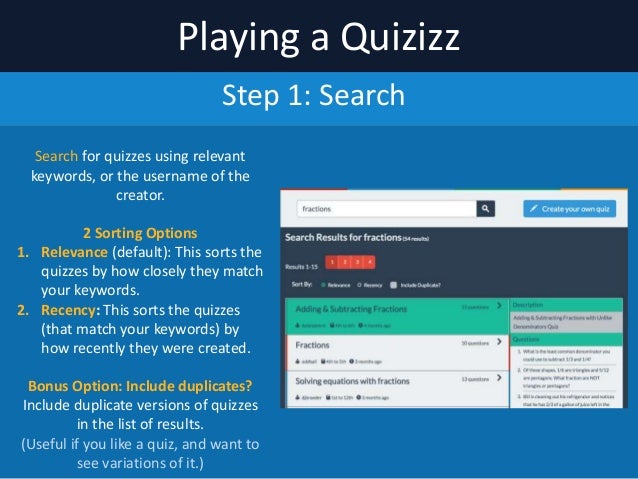
Quizizz is a fun way to conduct quizzes in your classroom. This is Great for conducting a quick review, pop quiz or even individual classwork.


You can search or create to find amazing quizzes made by other teachers, or create your own quizzes and share them with the world!


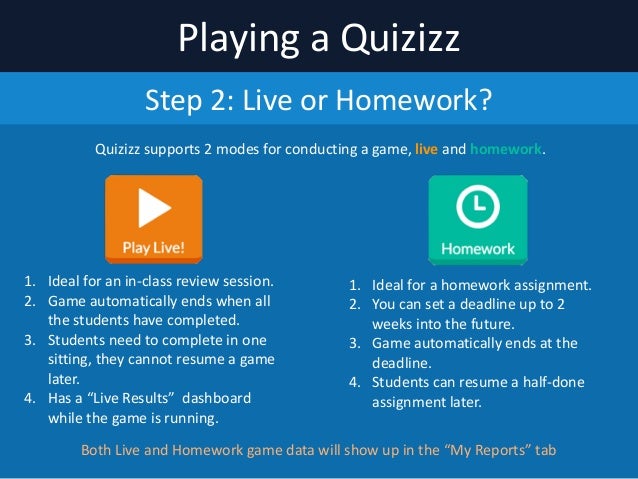
Start a "Live" game in class, or assign Quizizz as a fun "Homework" task. You control the competition by toggling the leaderboard, timer and other settings.


Students play together, but each at their own pace. Gamfication elements like avatars, leaderboard and funny memes add to the fun! Review your work in the end.


Use our detailed class and student-level reports to understand where your students need help.


Flippity

One of the activities that I always loved to do with my students when I was teaching was Jeopardy or using flashcards for review. Now many of us know, use and love Quizlet but what happens when you are fully immersed in the Google World! Well, then you have Flippity.net. With Flippity.net you can create flashcards (that look like REAL flashcards) BUT with words, PICTURES or VIDEOS!! Check out my blog "Making Flashcards and Creating Jeopardy with Google Spreadsheets"

Quizlet Live

As of April 2016 this program is still in Beta. Teachers can start the live version but students cannot.  "This is an in-class, team-based learning game based on any Quizlet study set. Students are randomly paired into teams of 3-4 students to race against other teams. Each team must work together to clear their board, and the first team to do so wins." -quizlet.com  Go to "Test out the beta of Quizlet's new in-class game" for more information. 

Tuesday, March 22, 2016

Vetting Resources, CSUnplugged and More!

There are a multitude of resources on the web but how do you determine what are good and useful and what are not.  Here are a few resources that may inspire and intrigue you and your students as well as some sites to help you vet your own materials:

Camp Google  

A Series Of Free Science Activities And Videos From Google.

Chrome Music Lab

Chrome Music Lab is a collection of experiments that let anyone, at any age, explore how music works. They're collaborations between musicians and coders, all built with the freely available Web Audio API. http://googleforeducation.blogspot.com/2016/03/introducing-chrome-music-lab.html

CSunplugged.org

The Unplugged project is to promote Computer Science (and computing in general) to young people as an interesting, engaging, and intellectually stimulating discipline. We want to capture people’s imagination and address common misconceptions about what it means to be a computer scientist.

EdSurge Product Index

The community-driven database of educational technology products on the EdSurge site allows teachers to search for products by category, grade level, and learning needs.

Graphite

Common Sense Media’s Graphite combines ratings from educators with reviews from its own expert team of editors and reviewers.

LearnTrials

LearnTrials provides teachers and districts a way to grade digital tools using a research-based rubric, then applies algorithms to provide additional context for each tool and how it is used, providing differentiated ratings based on a specific classroom setting or instructional need.

Learning Assembly

This collaborative network of educators and innovators focuses on piloting and scaling education technology solutions in schools across the country in ways that can transform teaching and learning.

Friday, March 11, 2016

Google Classroom for Teachers and Students

Google Classroom is constantly updating information to assist Teachers and Students.
The Google Classroom Team has developed a new YouTube series called “How-to-Tuesdays”, which is geared towards answering your most commonly asked questions. 

HoA #1 

Demonstrates how to grade and infuse rubrics into Grading Google Classroom Assignments 

Support pages FOR STUDENTS: 

Support pages FOR TEACHERS: 


Friday, February 19, 2016

Virtual Reality and Leap Motion

Leap Motion in VR

Over the past few days I have had more time to delve into the world of VR and utilize my Leap Motion.  A Leap Motion is a gesture and motion tracker that will follow the motions of your hands to remove the need for a mouse.  Leap Motion for the past 6 weeks has been running a 3D Jam 2.0 for developers to create their own software, apps and programs that would work and integrate with Oculus Rift (predominately) as well as other open source projects (such as Google Cardboard).


Trinus VR 

Unlike Oculus Rift, Google Cardboard, does not come with it's own graphical interface card and therefore cannot run its own programs directly from the device, therefore we need an engine that can run the program from the computer to our cell phone: Trinus.  Trinus (as stated from their website):
Trinus VR (previously known as Trinus Gyre) was created to provide PC gamers with a high-end virtual reality headset without needing to buy expensive hardware, because you already have the hardware in your pocket. Trinus VR uses the display and sensors of your own phone to transform it into a portal to your PC games. Live your PC games in virtual reality today.
I have been able to sail a ship in Wurm through Trinius and Google Cardboard, roll a ball through a labyrinth and Trinius and my HooToo (This was more difficult with the Leap Motion controls)


.

Problems

Distance Tracking

Once I attached the Leap Motion to the front of both my HooToo and my Google Cardboard, I had the same problem in both situations: Distance.  It was very difficult for me to figure out the distance from my hands to the Leap Motion which in turn made it difficult for the Leap Motion to sense my hands.  

Head Tracking

I have not spent enough time working with the Trinius software, but I was unable to integrate the head tracking into my programs.  Head tracking can run through Trinius in programs that have 360 degree rotation. 

Leap Motion Overheating

The adhesive I was using continually fell off as the Leap Motion was getting quite hot.  There is a Leap Motion vr developer mount for those interested for $20 through the Leap Motion Store.

Trinius Time Limitation 

For the free version of Trinius, you are limited to 10 minutes at a time.  For more time, the app costs $9.99.

Virtual Reality, Education and Society

During school holidays seem to be the only time that I get to delve deep into my hobbies.  Now most of you know Technology and especially Educational Technology are of great interest to me (good thing I work in Emerging Tech!), but also of interest to me are the trends of the future, Virtual Reality, Augmented Reality and how the two will come together to change the scope of the educational playground.

Virtual Reality

In June 2014, I was watching the Google IO developer conference and I saw that placed on the seats of the conference attendees was a piece of cardboard.  This was the first time Google Cardboard hit the market. I was instantly intrigued but did not run out to get one yet.   


I researched and finally got myself a pair in December 2014. I understood immediately how this was going to change the course of our educational system and wrote two blogs in in January 2015 and one more recently in November 2015.


Education 

As we think to the future, the device students choose to have in their hands are their cellphones, as recently noted in the WSJArticle Teens' New Homework Tool? A Cellphone highlighting a friend and former colleague, Heidi Bernasconi,  Students live in a virtual world where a device is always at their finger tips.  They can complete assignments and get news in real time; even see locations around the world in 3D.

Society

Recently, the NYTimes created their own Virtual Reality App and Website NYT VR: Virtual Reality and sent out to its print customers a Google Cardboard.  Nonny de la Peña's, a journalist and presenter at TEDWoman The Future of News? Virtual Reality trying to find ways to integrate the reality of News and still maintain integrity of the news stories.

Future

As educators, parents, administrators, we throw around the terms college and career ready, but what does that mean? Is swiping going to take the place of keyboarding as a skill of the future? 

Whatever the future holds...
Students need to be creators of information, not just consumers!

Wednesday, February 10, 2016

Resources to support student learning

More helpful resources from the web to assist in Special Education, ELL, World Language, Reading, Math, Current Events and More!

Center for Language Education and Research (CLEAR) 

The Center for Language Education http://clear.msu.edu/clear/ has a lot of free tools for World Language, ELL and Special Education teachers. On the website click on resources and then click on Rich Interactive Applications RIA. There are many tools here in which students can RECORD themselves using Video or Audio!

Google Tools for Reading

No matter what our content area is, every teacher is a teacher of reading; therefore, why not have a great list of Google Tools for Reading! These Google Tools have not been broken down by grade level but rather skill or topic.  

Google Tools for Math

Here are a few tools that are great for use in the Math classroom.  These Google Tools have not been broken down by grade level but rather skill or topic.

Countable - GREAT FOR ELECTION TIME! 

This allows students an opportunity to find an issue and create a current position on it and then defend or support it. Could change the face of how kids view government. Yay - Nay - debate - counterpoint.  It can also give the class an opportunity to write to the congressman/woman directly.  The coolest part is that “the next phase” -- you wait and then you can check back in and you can see how your congressman/woman voted.

Recharge Learning

The 4c's of learning, a Review of ALL Google Tools and More! A great compilation of resources in one location. 

Thursday, February 4, 2016

#SaferInternetDay, Matific, Soundtrap, Lab4u, TED-Ed


Also, Tuesday February 9 is #SaferInternetDay .  Click on the attached links for more information.


Matific is an app that support math education from kindergarten through grade 6 using playful interaction. A modular portfolio of educational apps designed to empower math education from kindergarten through grade 6. 

An easy-to-use collaborative platform for audio editing and music making for all ages.Soundtrap for Education is a revolutionary new, user-friendly platform for music making that disrupts how music is taught and learnt in schools across the world. 

Lab4U provides a platform that enables hands-on lab experiences through web and mobile devices, delivering low-cost solutions for Science Education. Lab4U is a web/mobile platform for low cost experimental scientific education, integrating technology and experimental science education using smartphones, tablets, free hardware and Augmented Reality.

Within the growing TED-Ed video library, you will find carefully curated educational videos, many of which represent collaborations between talented educators and animators nominated through the TED-Ed platform.

Wednesday, January 27, 2016

Cool Tools For School -SpEd, Penpalschools, YummyMath, MindsetKit

SpEdApps

There are great apps and ways to integrate Special Education tools into the classroom.  One great website that will help narrow your choices of special Education apps for both Android and IOS devices is SpedApps.  This app was created with the mindset to:
Develop a deeper understanding of the role of mobile applications in Special Education. http://spedapps.kent.edu/index.php

Penpalschools

Teachers sign up a class or learners can sign up on their own. Penpalschools matches everyone with their own PenPal for a 6-Week exchange. Students login to the website or mobile app each week to complete standards-aligned assignments focused on language, culture, and current events. Students share what they’ve written with their PenPals, who respond with their own ideas and perspectives.  https://www.penpalschools.com/ 


YummyMath

YummyMath is an easy way to bring real-life into the math classrooms. When math is explored in contexts that are familiar and of interest to students, students will be more engaged to do math, reason, think critically, question and communicate.  YummyMath's  activities are written to correspond with the NCTM Process Standards and the CCSS Standards for Mathematical Practice. http://www.yummymath.com/about-us/


MindsetKit

The Mindset Kit is a free set of online lessons and practices designed to help you teach and foster adaptive learning mindsets.  This website contains information about Growth Mindset, Teaching Growth Mindset, Assessments, as well as PD for teachers and staff around the idea of Growth Mindset.  Overall, it is a very useful place to start when looking for information on the topic of Growth Mindset.