Showing posts with label math. Show all posts

Wednesday, February 10, 2016

Resources to support student learning

More helpful resources from the web to assist in Special Education, ELL, World Language, Reading, Math, Current Events and More!

Center for Language Education and Research (CLEAR) 

The Center for Language Education http://clear.msu.edu/clear/ has a lot of free tools for World Language, ELL and Special Education teachers. On the website click on resources and then click on Rich Interactive Applications RIA. There are many tools here in which students can RECORD themselves using Video or Audio!

Google Tools for Reading

No matter what our content area is, every teacher is a teacher of reading; therefore, why not have a great list of Google Tools for Reading! These Google Tools have not been broken down by grade level but rather skill or topic.  

Google Tools for Math

Here are a few tools that are great for use in the Math classroom.  These Google Tools have not been broken down by grade level but rather skill or topic.

Countable - GREAT FOR ELECTION TIME! 

This allows students an opportunity to find an issue and create a current position on it and then defend or support it. Could change the face of how kids view government. Yay - Nay - debate - counterpoint.  It can also give the class an opportunity to write to the congressman/woman directly.  The coolest part is that “the next phase” -- you wait and then you can check back in and you can see how your congressman/woman voted.

Recharge Learning

The 4c's of learning, a Review of ALL Google Tools and More! A great compilation of resources in one location. 

Thursday, February 4, 2016

#SaferInternetDay, Matific, Soundtrap, Lab4u, TED-Ed


Also, Tuesday February 9 is #SaferInternetDay .  Click on the attached links for more information.


Matific is an app that support math education from kindergarten through grade 6 using playful interaction. A modular portfolio of educational apps designed to empower math education from kindergarten through grade 6. 

An easy-to-use collaborative platform for audio editing and music making for all ages.Soundtrap for Education is a revolutionary new, user-friendly platform for music making that disrupts how music is taught and learnt in schools across the world. 

Lab4U provides a platform that enables hands-on lab experiences through web and mobile devices, delivering low-cost solutions for Science Education. Lab4U is a web/mobile platform for low cost experimental scientific education, integrating technology and experimental science education using smartphones, tablets, free hardware and Augmented Reality.

Within the growing TED-Ed video library, you will find carefully curated educational videos, many of which represent collaborations between talented educators and animators nominated through the TED-Ed platform.

Wednesday, January 27, 2016

Cool Tools For School -SpEd, Penpalschools, YummyMath, MindsetKit

SpEdApps

There are great apps and ways to integrate Special Education tools into the classroom.  One great website that will help narrow your choices of special Education apps for both Android and IOS devices is SpedApps.  This app was created with the mindset to:
Develop a deeper understanding of the role of mobile applications in Special Education. http://spedapps.kent.edu/index.php

Penpalschools

Teachers sign up a class or learners can sign up on their own. Penpalschools matches everyone with their own PenPal for a 6-Week exchange. Students login to the website or mobile app each week to complete standards-aligned assignments focused on language, culture, and current events. Students share what they’ve written with their PenPals, who respond with their own ideas and perspectives.  https://www.penpalschools.com/ 


YummyMath

YummyMath is an easy way to bring real-life into the math classrooms. When math is explored in contexts that are familiar and of interest to students, students will be more engaged to do math, reason, think critically, question and communicate.  YummyMath's  activities are written to correspond with the NCTM Process Standards and the CCSS Standards for Mathematical Practice. http://www.yummymath.com/about-us/


MindsetKit

The Mindset Kit is a free set of online lessons and practices designed to help you teach and foster adaptive learning mindsets.  This website contains information about Growth Mindset, Teaching Growth Mindset, Assessments, as well as PD for teachers and staff around the idea of Growth Mindset.  Overall, it is a very useful place to start when looking for information on the topic of Growth Mindset.


Friday, June 19, 2015

MaKey MaKey...What problem do you want to solve?

This has been a fantastic year of thinking, learning, growth and development amongst many of the teachers and students across the districts that I have been working.  From learning and integrating Google Drive, Google Classroom, Flipped lessons, Coding, and finally STEAM integration.  The most important item in the classroom is that students are learning, growing, stretching and reaching their fullest potential.

As this year has come to a close, one class at W.E. Cottle received a grant from Donors Choose for 5 MaKey MaKey's .  Now the name, MaKey MaKey, may sound funny but a "MaKey MaKey is an invention kit for the 21st century. Turn everyday objects into touchpads and combine them with the internet. It's a simple Invention Kit for Beginners and Experts doing art, engineering, and everything in between".  Class 5B at W.E. Cottle had already experienced coding through the Hour of Code and through two projects in CS-First.  These students also had the opportunity to freely create their own projects in Scratch (Tardis Pi  and Google Thank You's) and had the opportunity to present these to Googler's in NYC (Cottle 5B Goes to Google).

Students were required to use their knowledge and understanding of problem solving as well as computational thinking, as well as learning a few lessons in conductivity to create musical instruments in groups of 4.  Each group had a:

  • Recorder -the note taker; responsible for recording the happenings of the day
  • Musician -in charge of creating the music/coding
  • Artist -in charge of creating the design of the project
  • Leader -in charge of keeping the group together and on track; in charge of keeping all the parts together, making sure all the parts were taken out and put away at the beginning and end of class, etc.


The students were required to use their knowledge of:
  • Science -to understand and apply how conductivity works 
  • Technology -to code and synthesize how the MaKey MaKey's  
  • Engineering -to create their instruments in a manner that would make them play
  • Art -to design an instrument out of whatever materials they deemed fit
  • Music -to create music and a musical instrument while making the computer "play" the music how they want
  • Math -to create their design and code their instrument
  • ELA- to record their progress as each day passed and predict what would occur on the next day
This was just one of the many innovative projects that has been completed across the many districts this year! 

So as we come to this year's close and next year's opening, let us reflect and think...
WHAT PROBLEM DO YOU WANT TO SOLVE?

Thursday, April 30, 2015

Ramapo Resources!!

There has been a lot of great work happening throughout the district this week particularly focused around Google Classroom!! Don't forget some of the great NEW features that Google Classroom came out with recently.  Also, I have put together a folder on the Google Drive entitled PD Documents and shared it with the entire district that includes a variety of documents that may be of interest to you.

Some of the documents (and sub-folders) include information such as:
Please avail yourself to these resources as they might be useful to you now or at a later date.  If you would like to add the ENTIRE PD Documents folder to your Google Drive:

  • Click on PD Documents 
  • Click on Open in Drive 
    • You will then see a Yellow pop up at the top that says "PD Documents has been added to Google Drive"


  • When you NOW Click on Open in Drive... 


Thursday, April 16, 2015

Math and Google Docs

Many math teachers tell me that it is very difficult to use Chromebooks or Google Docs in the Math class. Although, yes, I agree there are many parts of the Math class that need to be done on paper, that does not mean that we cannot still use the Chromebooks, Google Docs or technology to assist us! Some of the following ideas came from Alice Keeler's blog 5 Ways Students Can Use Google Docs in Math.

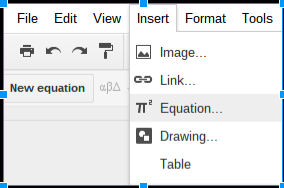
Equation Editor in Google Docs 

  • This tool can be found under Insert --> Equation
  • With this tool you can insert equations, symbols, and create different algebraic questions for student use.


Drawings

  • Great tool for creating 2D or 3D images


Graphing

  • If students need to use graph paper provide them with a Google Document as a template that already contains graph paper. Go to http://images.google.com and type in "graph paper" to find images. Save a graph paper image.
  • Insert a table in the Google Document and in the cell of the table insert a drawing. Insert the graph paper image onto the drawing canvas. Provide the template to students. Double clicking on the drawing image allows them to draw on the graph paper.


Inserting Snapshot or Screenshot


  • Being in a paperless classroom does not mean that you are necessarily always paperless! I love this example by Alice Keeler 5 Ways Students Can Use Google Docs in Math.  By having the students write their work on paper first and then take a picture using the Insert Image function on their Google Doc, the students will be able to share their work and the teacher will be able to comment on what they have done.  


g(Math) Add-on

  • Used to create graphs or LaTex commands to create complex or simple math equations.

    Thursday, March 19, 2015

    It's Review Time!!

    Oh it's that GLORIOUS time of year!! Grades 3-8 ELA and Math Assessment time.  While preparing for these tests students and teachers both need to "mix things up" every once in a while.  Here are two great review activities through using game based learning that you can use in class to assist your students in fun, creative and interesting ways.

    Socrative

    Socrative can be found in the Chrome Web Store  and similarly to Kahoot lets teachers engage and assess their students with educational activities on tablets, laptops and smartphones. Socrative uses real time questioning, BUT IN ADDITION HAS instant result aggregation and visualization, wherein teachers can gauge the whole class’ current level of understanding.


    Here is a great User Guide that will show all the steps for working through, creating and understanding Socrative

    For Teachers: 

    Kahoot

    Kahoot  is a site where teachers can Create, quizzes, discussions or even surveys for their students to answer through https://kahoot.it.  Using the simple and speedy ‘drag n drop’ creation tool, teachers can create and manage their work in the form of quizzes, surveys or polls related to specific topics; either asking quick questions ‘on the go’ to get feedback or opinion, or more in depth questions for formative assessment. Students can also create quiz questions of their own for other students to answer and quiz each other through https://getkahoot.com.


    Thursday, November 27, 2014

    Online Virtual Math Manipulatives (Dice, Spinners, Blocks, Clocks, Cubes and More!!)

    Many math teachers often say "One of the greatest features of the smart board is the gallery of virtual manipulatives".  I have found an online gallery that works as a whiteboard (and on chromebooks) that have these virtual manipulatives that will also work on the chromebooks. Virtual Manipulatives includes everything from virtual dice, to online spinners, tangrams, thermometers, etc.  This can be a site that you can embed into a document, a Google Classroom Assignment, Google Presentation etc. and then have students complete their own inquiry based learning.  There are also game boards, story boards and workmats for the students to use as backgrounds, games and templates for their work.